
Complete Guide to AMD Alveo V80 Server Accelerator Card

The AMD Alveo V80, based on the Versal HBM XCV80 adaptive SoC architecture, is a high-end server accelerator for high-bandwidth, high-throughput, large-scale parallel computing in data centers. It is widely used in HPC, quantitative finance, big-data analytics and network acceleration. The V80 uses the new Versal HBM architecture with strict version binding; standardized deployment of prerequisites, toolchain and base framework is essential for engineering compilation, board bring-up and stable operation.
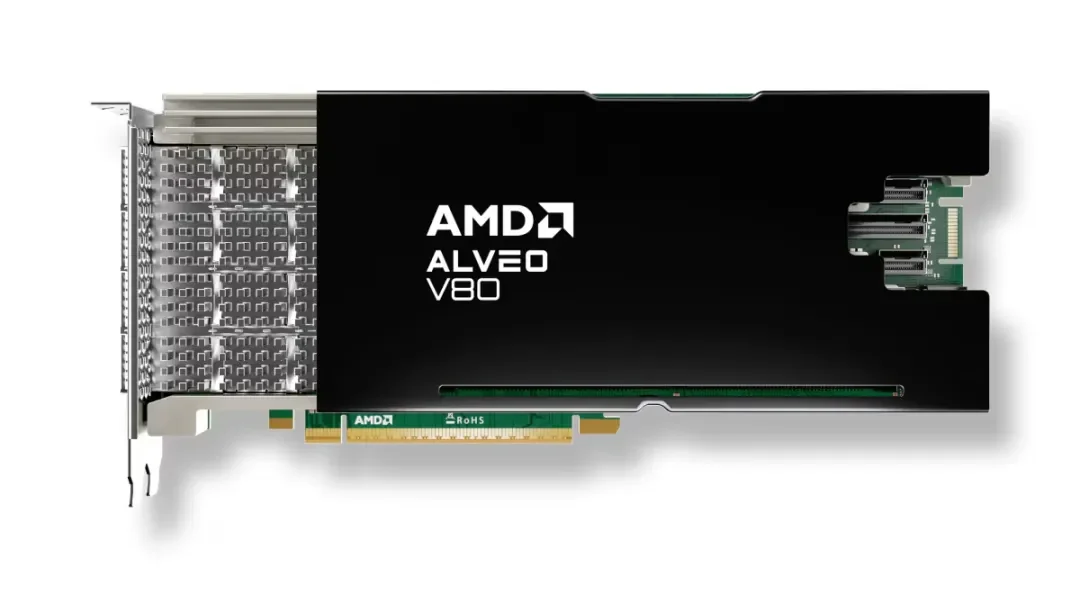
This article focuses on V80 FPGA low-level prerequisites, covering hardware verification, system setup, driver deployment, Vivado installation and AVED framework deployment — a practical guide for V80 bring-up.
1. Prerequisites Overview
1.1 Environment Requirements
The Alveo V80 Versal HBM architecture has strict compatibility requirements: only Vivado 2023.1 and later with matching framework versions are supported. Older toolchains cause device recognition failure, IP adaptation errors, build failures and board debug issues. Version matching must be strictly followed.
1.2 Required Components
The V80 low-level FPGA prerequisite environment consists of three essential components for project setup, low-level debugging and hardware adaptation:
- System Dependencies: Ensure tool execution, code compilation, framework checkout and permission calls
- VivadoToolchain: Core compilation tool with Versal HBM device support
- AVED Framework: V80-specific low-level framework with pre-integrated PCIe, DMA, clock/reset, board management and self-test IP
1.3 Key Hardware Parameters (for Environment Adaptation)
- Bus Interface: PCIe Gen5 x16 (requires motherboard hardware and BIOS support)
- Power: 190W TDP; the PCIe slot must support 200W or more under full load
- Cooling: Passive cooling; relies on server chassis airflow, no active fan
- Architecture:Versal HBM XCV80,Compatible with the latest toolchain and AVED framework
- Onboard Modules: Integrated native PCIe controller, high-speed DMA engine, AMI management module and XBTEST self-test module
1.4 Deployment Goals
- Complete physical installation and ensure the server enumerates the V80 device;
- Set up a clean, compatible system with all dependencies installed;
- Install the complete Vivado toolchain and Versal HBM device support package;
- Install the matching AVED framework so V80 projects can be created and built directly;
- Run hardware self-test and link validation to mitigate compatibility and firmware risks.
2. Hardware Setup and Physical Installation
2.1 Server Hardware Requirements
- Slot Requirements: Standard PCIe Gen5 x16 slot required; a Gen4 slot causes bandwidth degradation, protocol negotiation issues and half performance;
- Power Requirements: PCIe slot must supply ≥200W under load; insufficient power causes card drops, reboots or throttling;
- Cooling Requirements: Server chassis airflow must be unobstructed for passive cooling;
- System Requirements: Ubuntu 20.04/22.04 or RHEL 8/9 64-bit server OS; desktop OS and legacy server OS are not supported.
2.2 Physical Installation and BIOS Configuration
- With the server fully powered off and ESD discharged, insert the V80 accelerator into a double-width PCIe slot and secure the bracket;
- Boot into the motherboard BIOS and enable PCIe Gen5 full performance mode, disable PCIe power-saving, frequency throttling and auto-sleep policies;
- Disable PCIe compatibility mode and enable high-performance mode;
- Save BIOS settings and reboot for changes to take effect.
2.3 Hardware Recognition Check
After reboot, run the following commands to verify hardware mount status and confirm the device is recognized:
|
Plain Text |
If the terminal outputs AMD Versal XCV80 device info, the hardware is properly installed. If no output appears, recheck seating, slot status and BIOS configuration.
3. Driver and Framework Installation
3.1 Strict Version Requirements
V80 low-level development versions are strictly bound; all components must match. Requirements:
- VivadoToolchain:1and above. Includes the complete Versal HBM XCV80 device support package
- Core framework:AVED(Alveo Versal Example Design)1
- Management tools: AMI device management tool, XBTEST hardware self-test tool
3.2 Installing System Dependencies
Before deploying drivers and frameworks, install system dependencies to ensure tool operation, code compilation and source-code fetching work correctly:
|
Plain Text |
3.3 Vivado Toolchain Installation and Environment Setup
Vivado is the core compilation tool for V80 low-level development, bundled with hardware drivers and device libraries, and is the foundation for device recognition, project compilation and bitstream generation.
- Install Vivado 2023.1 or later and during installation you must select the Versal HBM XCV80 device support package; missing device libraries will prevent chip recognition and IP adaptation;
- After installation, configure global environment variables so tools can be called from any terminal and hardware devices are resolved correctly.
|
Plain Text |
3.4 AVED Official Framework Installation
AVED is the V80-specific low-level framework with officially adapted PCIe Gen5, high-speed DMA, clock/reset, hardware monitoring and self-test IP. Developers need not adapt low-level protocols manually; it is the foundation for all secondary development.
|
Plain Text |
Once the framework is installed, create V80 projects directly from built-in templates to complete low-level hardware adaptation quickly.
4. Environment Validation and Hardware Self-Test
After all drivers, tools and frameworks are deployed, run the official self-test tool to validate environment integrity and confirm no hardware adaptation issues or version conflicts.
4.1 Basic Hardware Self-Test
|
Plain Text |
A 100% pass rate with no errors indicates proper driver adaptation and framework operation.
4.2 Full Device Status Check
|
Plain Text |
5. Troubleshooting Common Issues
5.1 Device Recognition Failure
Symptom: lspci cannot enumerate the V80 device
Solution: Check PCIe slot power, hardware seating and BIOS Gen5 configuration; reboot and re-detect.
5.2 Project Initialization Device Recognition Failure
Symptom: Vivado reports errors opening the AVED project or cannot recognize the XCV80 device
Resolution: Install the Versal HBM device support package and ensure the Vivado version exactly matches the AVED framework version.
5.3 Hardware Self-Test Link Anomaly
Symptom: xbtest fails or the PCIe link downgrades
Solution: Verify production hardware revision and native firmware, lock PCIe Gen5 full speed in BIOS, and check slot power stability.
5.4 Build Environment Dependency Errors
Symptom: AVED project build reports missing dependencies or command execution failure
Resolution: Reinstall system dependencies, refresh environment variables, and ensure the Vivado toolchain takes effect globally.
6. Prerequisites Deployment Summary
The core of AMD Alveo V80 prerequisite deployment is completing the standardized, version-matched installation of system dependencies, Vivadotool drivers, AVEDand the low-level framework. This environment provides full low-level support for V80 hardware recognition, IP adaptation, project compilation and board debugging.
By strictly following version matching, fully installing device support libraries and avoiding unofficial hardware adaptation risks, a stable, clean V80 low-level development environment can be established, laying the foundation for subsequent FPGA logic development and hardware debugging.